How to Budget Without Spreadsheet Overwhelm: A Simple Visual Budgeting System
Tired of complicated budget spreadsheets? Learn a simple visual budgeting system that helps you track money, save more, and stop the overwhelm.
If you’ve ever opened a budgeting spreadsheet, stared at fifteen unlabeled columns, and closed the tab within two minutes you’re not bad at budgeting. You’ve just been using the wrong tool.
Most people don’t quit budgeting because they don’t care about their money. They quit because the system is exhausting. Formulas that break. Categories that don’t match real life. A tracker that demands you log every $4 coffee or the whole thing falls apart.
Here’s the good news: budgeting doesn’t have to look like an accounting spreadsheet. It can be simple, visual, and something you actually want to open every month. This is the exact system worth switching to if spreadsheet budgeting has never stuck for you.
Why Spreadsheet Budgeting Fails Most People
Before fixing the problem, it helps to name it clearly. A typical budgeting spreadsheet fails for a few consistent reasons:
- Too many numbers, not enough context. Rows of figures don’t tell you where your money actually goes they just report it back at you.
- It takes too long to maintain. Updating formulas and re-checking categories eats the 10 minutes you were trying to save.
- No clear next action. A spreadsheet can show you overspent $200 on “misc,” but it won’t tell you what to actually do about it.
- No emotional payoff. Budgeting sticks when you see progress. A wall of numbers doesn’t give you that.
If any of this sounds familiar, the fix isn’t more discipline — it’s a simpler system.
The Simple Visual Budgeting System (No Spreadsheet Required)
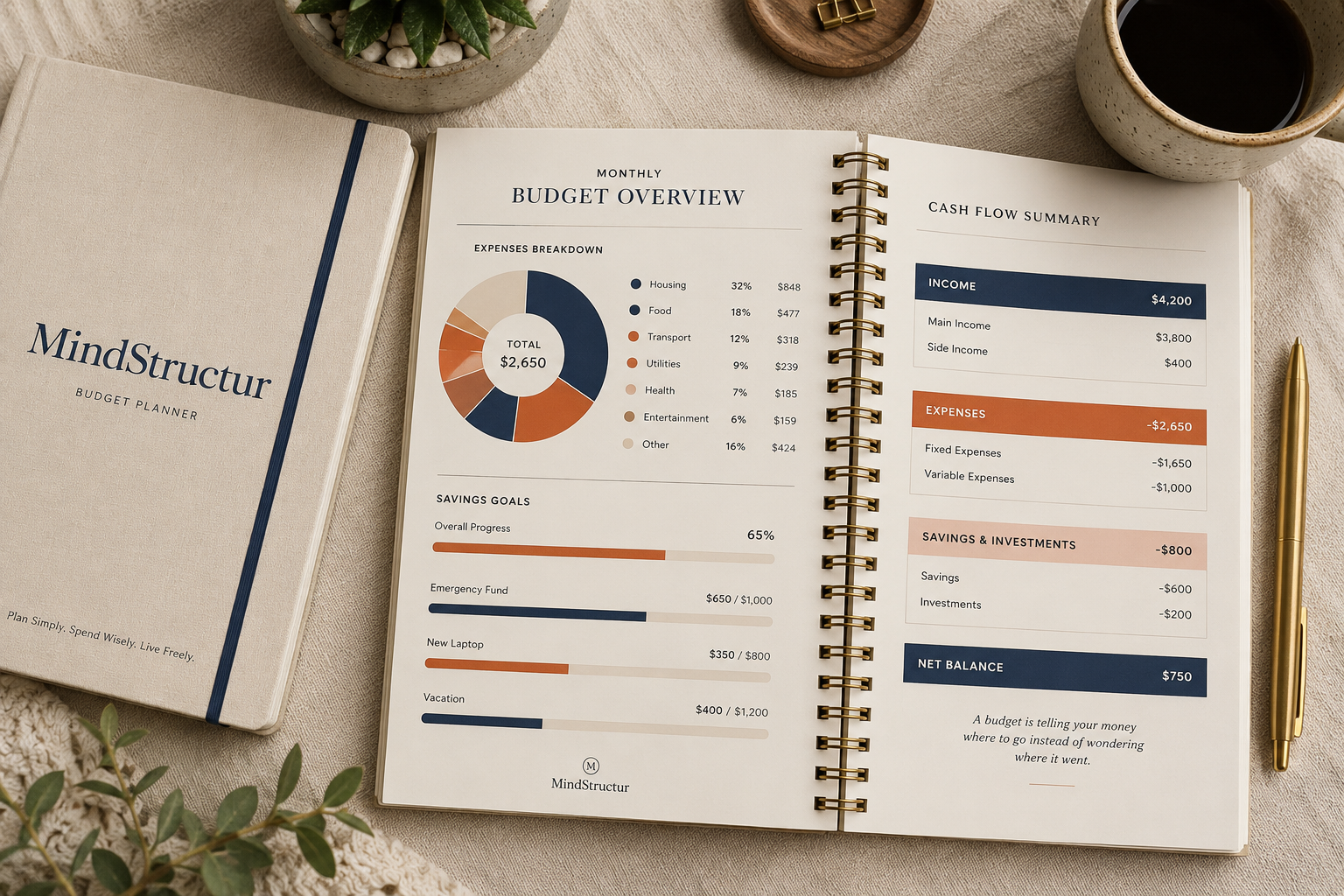
A visual budget system works because it mirrors how your brain actually processes money: as categories, proportions, and progress — not raw digits in a grid. Here’s the core structure:
1. One Monthly Overview Page
Instead of multiple tabs, everything lives on one page: income, total expenses, savings, and what’s left to budget. One glance tells you where you stand no scrolling, no formulas.
2. A Visual Expense Breakdown
Rather than a long list of transactions, group spending into simple categories (housing, food, transport, personal, entertainment) and represent them visually a donut chart or simple bar view. You instantly see proportions, which is what actually changes behavior. Seeing “35% of my money goes to housing” lands differently than reading a number.
3. A Cash Flow Snapshot
List income sources and expense categories side by side, with a clear “left to budget” total. This single number not twenty scattered ones is what tells you whether you’re on track.
4. Visible Savings Goals
A savings goal with a simple progress bar (e.g., Emergency Fund: $500 / $1,000) works because progress you can see is progress you stick with. This is one of the most consistent findings in behavior-change research on financial habits visible progress markers outperform static number tracking.
5. Top Priorities, Not a Full Ledger
You don’t need to log every transaction to budget well. Three to five top financial priorities for the month (build emergency fund, pay off a card, save for a trip) keep you focused on decisions, not data entry.
Budgeting for Beginners: Where to Start
If you’re budgeting for the first time, don’t start by trying to categorize every past expense. Start here instead:
- Write down your income — all of it, including side income.
- List your fixed costs — rent, utilities, subscriptions, anything that doesn’t change month to month.
- Estimate variable costs — food, transport, personal spending. Round numbers are fine; precision comes later.
- Set one savings goal — even $50/month builds the habit before the amount matters.
- Review weekly, not daily. A 5-minute weekly check-in beats a daily habit that burns out by week two.
This is deliberately low-friction. A budget you actually maintain for 6 months beats a “perfect” spreadsheet you abandon after 6 days.
Monthly Budget Template vs. Spreadsheet: What Actually Changes
| Spreadsheet Budget | Simple Visual Budget System | |
|---|---|---|
| Setup time | Long (formulas, categories, formatting) | Minutes |
| Maintenance | Manual updates, formula errors | Fill-in-the-blank style |
| Where money goes | Numbers only | Visual breakdown + numbers |
| Motivation | Low no visible progress | High — visible savings progress bars |
| Best for | Spreadsheet-comfortable users, complex finances | Most people, especially budgeting beginners |
Why a Simple System Builds Financial Peace, Not Just Financial Control
The goal of budgeting isn’t the spreadsheet it’s the feeling of knowing where you stand. A budget planner built around clarity (not complexity) gives you that faster: you open it, you see the picture, you make one decision, you close it. No dread, no 45-minute Sunday spreadsheet session.
That’s the entire philosophy behind a simple, visual monthly budget system: budgeting should reduce stress, not add to it.
Start Budgeting Without the Overwhelm
If building this system from scratch still feels like one more thing on your to-do list, the Digital Finance Planner gives you this exact structure monthly overview, visual expense breakdown, cash flow snapshot, and savings goal tracking ready to use, no spreadsheet skills required.
And if you want a low-pressure way to build the savings habit first, before tackling a full budget, the Money Saving Challenge Printable – $1 Savings Tracker (Save $100) is a simple entry point small, visual, achievable steps that build the same “seeing progress” habit this whole system is built on.